AI Image Generator for Presentations
Create Presentation-Ready Images in Seconds
An AI image generator for presentations creates custom visual assets for your slides, generating individual images rather than building a full deck. Use Ambience AI to make backgrounds, illustrations, and supporting graphics for PowerPoint, Google Slides, or Keynote.
- Presentation-ready visuals in seconds
- Commercial use included
- Free to try: no credit card required

What is an AI image generator for presentations?
An AI image generator for presentations creates custom visual assets for your slides. It generates individual images rather than an entire slide deck, so you can make backgrounds, illustrations, product visuals, and supporting graphics for PowerPoint, Google Slides, and Keynote. For work outside slides, use the general AI image generator.
How to create AI images for a presentation
- Identify the slide's message and the asset type you need.
- Prompt for a slide-safe composition with space for text.
- Choose a wide aspect ratio or another supported format.
- Generate consistent variations.
- Download and add the image to your deck.
For sharper output, learn to write better prompts for presentation images, and to create consistent image variations.
AI Image Tools Perfect for Presentations
Transform your presentations with our AI image generator - create professional visuals that enhance your slides and engage your audience.
Instant Refinement
Not quite right? Regenerate presentation assets with tweaked prompts in seconds. Iterate on colors, styles, and compositions until you achieve exactly the visual you envisioned for your slides.
Professional Image Styles
Generate images ideal for business contexts: clean backgrounds, corporate graphics, data visualizations, and professional illustrations.
High-Resolution Quality
Create crisp, detailed images that look sharp on large screens and projectors. Premium users can upscale up to 4x for conference banners and printed handouts.
Multiple Format Options
Generate images in various dimensions and formats optimized for slides, from wide backgrounds to square graphics and vertical elements.
Commercial Usage Rights
Use generated images in client presentations, sales decks, training materials, and any business communication without licensing restrictions.
Lightning Fast Creation
Generate presentation-ready images in seconds, not hours. Perfect for last-minute presentations or when you need multiple visual options quickly.
Create Presentation Visuals for Professional Communication
See how professionals use our AI image generator to create compelling visual content for their presentations.
Executive Meeting Backgrounds
Generate sophisticated, professional backgrounds that make boardroom slides look polished without distracting from your message. Use image-to-image to maintain consistency across the deck.

Sales Deck Visuals
Create product mockups, service illustrations, and compelling graphics that help prospects visualize your solutions. Generate variations of the same concept for different slides.

Conference Slide Graphics
Design speaker-worthy section headers, topic illustrations, and audience-engaging visuals. Upload your conference branding and generate consistent graphics throughout your presentation.

Brand-Consistent Visuals
Upload a reference image and generate variations with the same style and theme. Perfect for creating a cohesive visual library across your entire presentation.
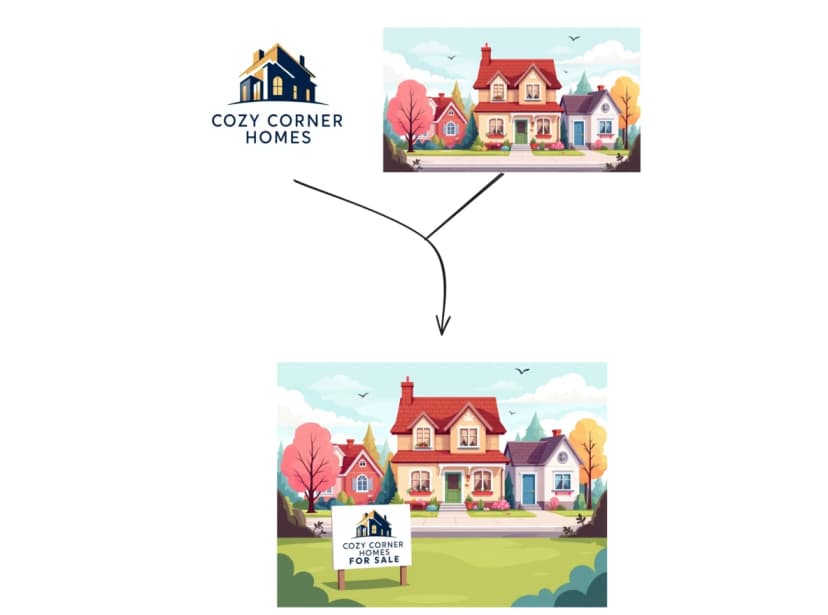
Client Proposal Graphics
Generate professional service mockups, strategic planning visuals, and project illustrations that demonstrate your expertise. Maintain visual consistency with image-to-image generation.
Corporate Communication
Create branded graphics for company updates, team meeting slides, training materials, and internal communications. Generate variations of company themes for different departments or topics.

Building a startup? See how founders use Ambience AI for pitch decks, launch assets, and investor updates.
Raising a round or closing a deal? Our AI pitch deck image generator is tuned for investor and sales decks.
Building Professional Slide Visuals is Easy
No design experience needed - use our AI image generator to create professional visuals perfect for any presentation.
Describe Your Visual Need
Enter a prompt like "business background for quarterly report," "digital transformation illustration," or "handshake for partnership slide."
Generate or Upload Reference
Create from scratch with text prompts, or upload an existing image and generate consistent variations using our image-to-image feature.
Download & Add to Slides
Get your high-resolution image in seconds, then drag it directly into PowerPoint, Google Slides, Keynote, or any presentation software.
Hear from our Ambience AI Community
Discover how business leaders leverage our AI image generator for compelling presentation content.
“Our quarterly board presentations went from boring slides to visually compelling stories. The AI understands exactly what works in a professional setting.”
Michael R.
Senior Vice President
“As a sales manager, I need presentations that close deals. These AI-generated visuals give my proposals the professional edge that wins clients.”
Jennifer L.
Sales Manager
“Training sessions used to be death by PowerPoint. Now my educational slides have engaging visuals that keep learners focused and improve retention.”
Dr. Sarah K.
Corporate Trainer
AI Presentation Image Generator FAQs
Everything you need to know about creating professional presentation visuals.
Yes. Describe the slide's message and the asset you need, and Ambience AI generates a custom image, such as a background, illustration, or product visual, that you can download and drop into your deck.
No. This tool generates individual images for your slides rather than building an entire deck. You add the images to PowerPoint, Google Slides, or Keynote yourself.
Use a wide 16:9 aspect ratio for full-slide backgrounds and 1:1 or 4:3 for inset graphics. You can generate common aspect ratios and download PNG or JPEG files that stay sharp on large screens.
Yes. Download the generated image and drag it into PowerPoint, Google Slides, or Keynote. You receive commercial usage rights, so the images are fine for client and sales decks.
Provide a reference image and prompt for variations that match its style and colors, so backgrounds and illustrations stay consistent across the deck.