What Is an AI Product Video? How to Make a Product Demo
Learn what an AI product video is and how to make a product demo with Ambience AI. Turn a product photo into a polished video that sells, free to start.
An AI product video is a short marketing video that shows off a product using AI-generated or AI-animated visuals in place of a traditional camera shoot. You start from a product image or a description, and AI turns it into motion, so you can make a product demo in minutes without a studio, a film crew, or editing software.
This guide explains what an AI product video is, why product videos matter for sales, and how to make one on Ambience AI. You will also find prompt examples, real use cases, and best practices you can apply to your very next launch.
🎬 What Is an AI Product Video?
An AI product video is a video that presents a product using artificial intelligence to create or animate the visuals. Instead of filming, you give the AI a product photo or a text description, and it produces a moving, share-ready clip.
Most AI product videos share a few common traits:
- Made from an image or a prompt, so you do not need a camera or a set
- Short and focused, usually a few seconds for social feeds or a bit longer for a landing page
- Built for a goal, whether that is clicks, sign-ups, or sales
- Easy to resize for Instagram Reels, TikTok, YouTube Shorts, or your product page
A traditional product shoot can take days of planning, filming, and editing. An AI product video compresses that into a single creative session, which means small teams, solo founders, and artists can all produce professional visuals on their own schedule.
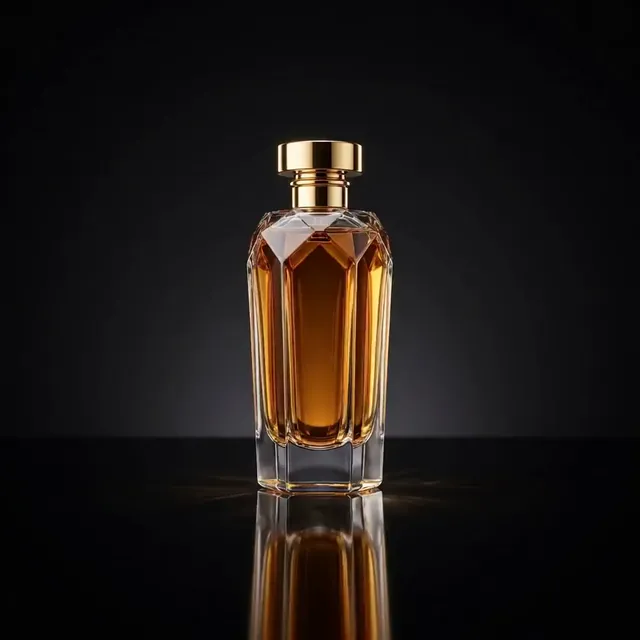
A rotating product reveal generated from a single prompt, the kind of clip that would take a studio and a turntable to film.
Prompt: A luxury perfume bottle slowly rotating on a reflective black surface, elegant studio lighting, premium product commercial aesthetic, smooth turntable motion
💼 Why Product Videos Matter
Video is one of the most persuasive ways to show what a product does and how it feels to own. A great product demo answers questions, builds trust, and gives shoppers the confidence to buy.
Video Sells
Motion shows value that a still photo cannot
A product video reveals scale, texture, and detail in a way a single photo often misses. Showing your product in motion helps shoppers picture it in their own hands, which makes the decision to buy feel easier and more natural.
Built for Social
Short video is the language of every feed
Instagram Reels, TikTok, and YouTube Shorts all reward short, engaging video. A well-made product demo gives you native content for every platform, so your launch can reach people where they already spend their time.
Fast and Affordable
Skip the studio, the crew, and the wait
Traditional product videos are expensive and slow to produce. Making one with AI removes the studio rental, the equipment, and the long edit, so you can test more ideas and ship campaigns while the moment is still fresh.
🛠️ How to Make a Product Demo with Ambience AI
You can make a product demo on Ambience AI in a few simple steps. The core workflow turns a product image into a moving video, and you can layer on music, narration, and multiple scenes when you want a fuller story.
Create a free account to follow along, then work through the steps below.
Getting Started
- Create or upload your product image. Use the AI Image Generator to create a clean product shot from a prompt, or upload your own product photo as a JPG or PNG.
- Turn the image into a video. Open the AI Video Generator, choose image-to-video, pick Standard or Cinematic quality, and add a short motion prompt that describes the movement you want.
- Add sound if you want it. Use the AI Audio Generator to create background music or a voiceover that matches the mood of your product.
- Build a full narrated demo. For a multi-scene showcase, the AI Story Video Maker composes a narrated video with voiceover, word-by-word captions, and background music from a single prompt.
- Share or download. Export your MP4 and post it to Instagram Reels, TikTok, YouTube Shorts, your product page, or an email campaign.
Pricing
Every new account starts free with 100 credits, so you can make your first product video without paying anything. Creating a product image costs 25 credits, and turning it into a video uses more credits depending on the quality and length you choose. See our pricing page for full details.
The AI Story Video Maker is a Premium feature that includes unlimited story videos, access to all premium models, and commercial usage rights. You can view pricing to compare plans.
💡 Best Prompts for AI Product Videos
When you turn a product image into a video, a short motion prompt guides how the scene moves. Keep the motion subtle and purposeful so the product stays the star. Here are prompts to try, grouped by product type:
Physical Products:
Slow 360-degree rotation of the product on a clean studio pedestal, soft studio lighting, gentle reflections on the surface, shallow depth of field
Beauty and Skincare:
Gentle camera push-in on the bottle, soft morning light, a few water droplets sliding down the glass, calm spa atmosphere, warm and inviting mood
Tech and Gadgets:
Smooth parallax pan across the device on a desk, screen glowing softly, cool ambient lighting, modern minimal setup, subtle floating particles
Food and Beverage:
Steam rising from the cup, warm golden light, slow gentle zoom, cozy cafe background softly blurred, appetizing and fresh feel
✨ AI Product Video Examples and Ideas
An AI product video can play many roles across your marketing. Here are practical ways creators use them:
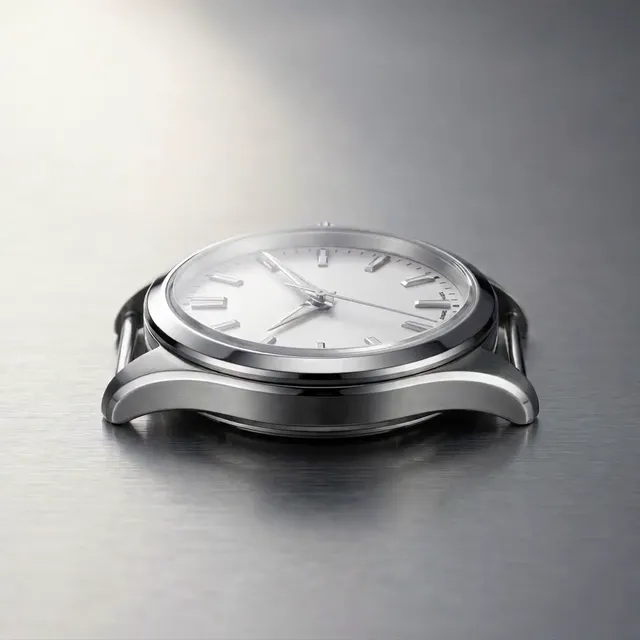
A cinematic camera move across a product, generated without a camera rig.
Prompt: Smooth cinematic camera glide across the face of a luxury wristwatch on brushed metal, soft directional lighting, shallow depth of field, premium commercial aesthetic
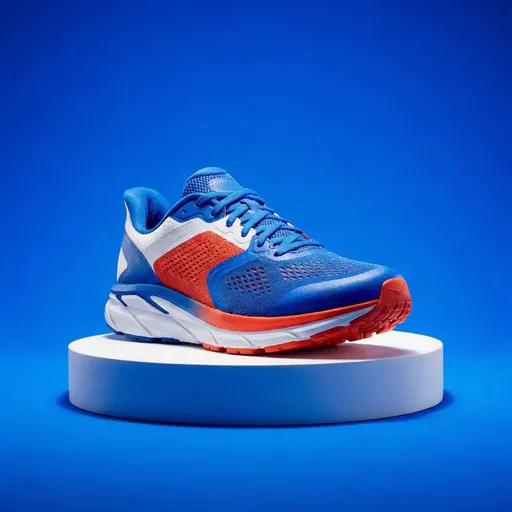
A slow push-in that shows off material and texture, ideal for an ecommerce showcase.
Prompt: A vibrant athletic running shoe on a clean studio pedestal, camera slowly pushing in to reveal texture and material detail, bright energetic lighting, dynamic product commercial look
- Ecommerce showcases: Bring a product photo to life on your store page or listing so shoppers see it in motion before they buy.
- Social ads: Create scroll-stopping short videos for Instagram, TikTok, and Facebook that highlight one clear benefit.
- Launch teasers: Build anticipation with a short, atmospheric clip that reveals your product just enough to spark curiosity.
- Hero background videos: Set a mood on your homepage or landing page with a looping, ambient product scene.
- Narrated feature tours: Use the Story Video Maker to walk through key features with voiceover, captions, and music in one connected video.
✅ Best Practices for AI Product Videos
A few habits make a big difference in how polished and persuasive your product demo feels:
- Start with a strong image. A clear, well-lit product shot gives the AI the best material to animate.
- Keep motion subtle. Gentle, purposeful movement looks premium, while heavy motion can distract from the product.
- Match the mood to your brand. Lighting, color, and pacing should feel like an extension of your look and voice.
- Design for sound-off viewing. Many people watch with the sound muted, so captions and clear visuals carry the message.
- Keep it short. A few seconds is plenty for a social feed, and a tight edit holds attention.
- Choose the right shape. Use vertical 9:16 for Reels, TikTok, and Shorts, and 16:9 for your website and YouTube.
- End with a clear call to action. Tell viewers exactly what to do next, whether that is shop, sign up, or learn more.
❓ Frequently Asked Questions
What is an AI product video?
An AI product video is a short marketing video that shows off a product using AI-generated or AI-animated visuals. You start from a product image or a description, and AI turns it into a moving clip you can share.
How do I make a product demo without a camera or crew?
Create or upload a product image, open the AI Video Generator, choose image-to-video, and add a short motion prompt. The AI animates your image into a video, so you never need a camera, a set, or editing software.
Is there a free way to make AI product videos?
Yes. Every new Ambience AI account starts with free credits, so you can create your first product video at no cost. You only move to a paid plan when you want more credits or premium features.
What length and format work best for product videos?
For social feeds, a few seconds in a vertical 9:16 shape works well. For a website or YouTube, a slightly longer 16:9 video gives you room to show more detail.
Can I add voiceover and music?
Yes. You can generate background music or a voiceover with the AI Audio Generator, or use the AI Story Video Maker to add narration, captions, and music to a multi-scene demo.
🔗 More AI Video Tools
Ambience AI gives you everything you need to create a product video from start to finish. Explore the tools and guides below:
- AI Video Generator: Turn product images into moving videos with image-to-video generation.
- AI Story Video Maker: Build narrated, multi-scene product demos with voiceover, captions, and music.
- AI Image Generator: Create clean, professional product images to animate.
- AI Audio Generator: Add music and voiceover to bring your product story to life.
- Image-to-Video Generation: Learn how to animate any image into a captivating video.
- Explore Community Creations: See what other creators are making with Ambience AI.