How to Make Facebook Videos with AI
Learn how to make scroll-stopping Facebook videos and ads with AI. A step-by-step guide to sizes, prompts, and best practices. Start free on Ambience AI.
Video is the format that stops the scroll on Facebook, yet most creators skip it because filming, editing, and resizing feel like too much work. With AI, you can go from an idea to a polished Facebook video in minutes, no camera or editing suite required. This guide walks you through the whole process on Ambience AI, from picking the right size to writing prompts that convert.
🎬 Why AI Facebook Videos Convert
Facebook rewards motion. Video posts earn more reach and engagement than static images, and video ads give you a richer canvas to show your product in action. AI makes that motion accessible to every creator, whether you run a small shop, market a service, or grow a personal brand.
Speed
Idea to finished clip in minutes
Skip the shoot and the timeline. Describe the scene you want, and an AI video generator renders it for you. That turnaround lets you post consistently and react to trends while they are still hot.
Low Cost
Studio-quality video without studio budgets
You do not need actors, props, or a production crew to make a Facebook video that looks professional. AI generation removes the biggest costs, so you can test more ideas for the price of a single traditional shoot.
Easy A/B Testing
Spin up variations to find your winner
The best Facebook ad is the one you discover through testing. With AI, you can generate several hooks, backgrounds, and styles from the same concept, then let the data show you which version drives the most clicks.
📐 Facebook Video Specs You Need to Know
Getting the size right is the difference between a video that fills the screen and one that gets cropped or ignored. Here are the current recommended specs for each Facebook placement.
- Feed: 4:5 vertical at 1080 x 1350 pixels gives you the most mobile screen space and tends to outperform square. The classic 1:1 square at 1080 x 1080 pixels still works across Feed, Marketplace, and carousel placements.
- Reels: 9:16 vertical at 1080 x 1920 pixels. Reels ads run up to 90 seconds, and 15 to 30 seconds is the performance sweet spot.
- Stories: 9:16 vertical at 1080 x 1920 pixels, up to 20 seconds per card so it fills the full screen.
- File format: MP4 or MOV using H.264 compression, with uploads accepted up to 4 GB.
- Length for direct response: Keep it under 15 seconds when your goal is a click or a sale, and put your hook in the first second.
AI-generated clips are naturally short and punchy, which makes them a perfect fit for the fast hooks that Facebook favors. You can generate a few seconds of high-impact motion, then use it on its own or as the opening beat of a longer ad.
🛠️ What You'll Need
Before you start, gather a few basics so the process stays smooth.
- A free Ambience AI account.
- A simple idea or one-line message for your video, such as the product, offer, or feeling you want to convey.
- Optional product photos or brand images if you want to animate something specific.
- Your target placement in mind, so you know which aspect ratio to plan for.
🎨 How to Make a Facebook Video with AI, Step by Step
Follow these steps to create your first Facebook video from scratch.
Step 1: Create your account
Create a free account to get started with free credits. New creators can explore image and video generation without a subscription.
Step 2: Choose your starting point
You have two easy paths to a Facebook video:
- Text to video: Open the AI Video Generator and describe the scene you want. This is ideal for lifestyle shots, ambient backgrounds, and concept ads.
- Image to video: Create a still with the AI Image Generator or upload a product photo, then animate it. Our image-to-video guide covers this workflow in depth.
Step 3: Write a prompt that fits Facebook
Describe the subject, the mood, the lighting, and the motion you want. Think about how the clip reads on a phone with the sound off, since most people watch that way. Keep the focal point centered so it survives cropping across placements.
Step 4: Generate and refine
Render your clip, review it, and adjust the prompt if the motion or framing needs work. Generate a few variations so you have options to test on your audience.
Step 5: Polish and publish
Add a caption or text overlay for the sound-off crowd, layer in music with the AI Audio Generator if you want a soundtrack, and design a strong opening frame with the AI Thumbnail Generator. Then upload to Facebook and set your placement.
💡 Facebook Video Prompt Examples
Great Facebook videos start with a clear, specific prompt. Here are real clips generated on Ambience AI, followed by prompts you can copy and adapt for common goals.

A product ad in 9:16, sized for Facebook Reels and Stories.
Prompt: A glowing skincare serum bottle surrounded by fresh water droplets and soft green leaves, clean fresh beauty aesthetic, bright airy lighting, premium cosmetic ad look

A warm brand-story clip that sets a mood without a single line of filmed footage.
Prompt: A barista pouring steaming milk into a latte forming a leaf pattern, cozy warm cafe atmosphere, soft window light, inviting lifestyle brand story mood
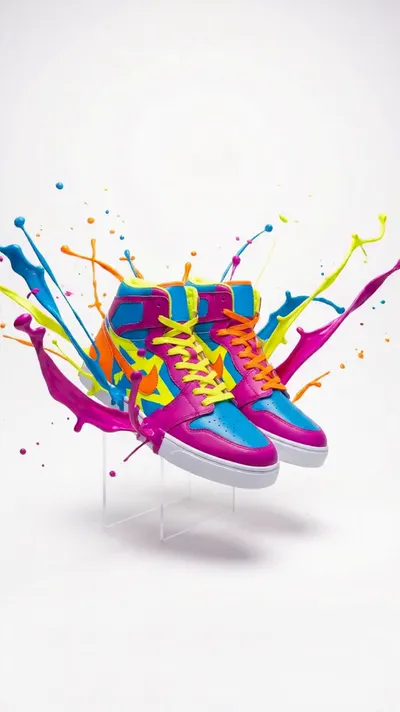
High-energy motion for a promo or sale, the kind of clip that stops the scroll.
Prompt: A pair of colorful sneakers with dynamic splashes of vibrant paint bursting around them, high energy motion, bold saturated colors, playful promotional sale aesthetic
Product Ad:
Close-up of a ceramic coffee mug on a sunlit kitchen counter, steam rising gently, warm morning light through the window, shallow depth of field, slow push-in camera move, cozy and inviting mood
Brand Story:
A small bakery at dawn, hands dusting flour across a wooden table, soft golden light, gentle steam from fresh bread, calm and handmade atmosphere, slow cinematic pan across the counter
Promo and Sale:
Vibrant flat-lay of summer sneakers on a bright pastel background, confetti drifting down, playful bouncing motion, high energy, bold and colorful, eye-catching for a limited-time sale
Service Business:
Modern home interior bathed in clean daylight, a plant swaying softly by a large window, calm and premium mood, slow drifting camera, minimal and professional feel for a home services brand
✅ Best Practices for Facebook Video Ads
Small creative choices make a big difference in how your Facebook video performs.
- Hook in the first second: Lead with your most striking visual or your core promise so people stop scrolling before they decide to move on.
- Design for sound off: Add captions or on-screen text so your message lands even when the audio is muted.
- Go vertical: Vertical 4:5 and 9:16 formats fill more of the mobile screen and tend to earn more attention than square.
- Keep it short: Aim for under 15 seconds for direct-response ads, and save longer edits for storytelling and awareness.
- End with one clear action: Tell viewers exactly what to do next, whether that is shop now, sign up, or learn more.
- Test variations: Run two or three versions with different hooks or visuals, then put your budget behind the winner.
🌟 Why Create Facebook Videos on Ambience AI
Ambience AI brings image, video, and audio generation together in one creative workspace, so you can build a complete Facebook video without juggling separate apps. You describe what you want, our assistant expands your prompt, and the platform handles the heavy lifting.
That makes Ambience AI a practical Facebook ad maker for creators who want professional results on a small budget. You can start free, test ideas quickly, and scale up only when you find what works. See the pricing page for full plan details, and browse community creations for inspiration.
🔗 More AI Tools for Facebook Content
Round out your Facebook workflow with the rest of the Ambience AI toolkit.
- AI Video Generator: Turn text prompts or images into short, scroll-stopping clips.
- AI Story Video Maker: Build multi-scene story videos for longer Facebook posts and ads.
- AI Image Generator: Create product shots, backgrounds, and stills to animate.
- AI Thumbnail Generator: Design bold opening frames and cover images that earn the click.
- AI Audio Generator: Add music and sound to give your videos a professional finish.
- Best AI Video Tools Guide: Compare the top AI video tools to plan your content strategy.