How to Design Instagram Reels Using AI
Learn how to design Instagram Reels using AI. Turn a text prompt into scroll-stopping 9:16 video with Ambience AI's free generator, no filming needed.
Instagram Reels reward creators who post consistently, and AI makes that pace possible without a camera crew or an editing suite. With the right prompts and a clear plan, you can design Instagram Reels using AI that look polished, stay on brand, and stop the scroll.
This guide walks you through the full workflow: the specs that matter, a step-by-step process, prompt ideas you can copy, and best practices for Reels that drive engagement.
🎬 Why Design Instagram Reels with AI
Filming, lighting, and editing a Reel the traditional way takes hours. AI compresses that into minutes, which means you can test more ideas, publish more often, and find what your audience loves faster. Ambience AI gives you the video, imagery, and audio pieces in one place.
Built for Vertical
9:16 video sized for full-screen Reels
Reels live in a 1080 by 1920 vertical frame, so your video should be born that way. Our AI Video Generator creates motion in the 9:16 aspect ratio Instagram recommends, which keeps your content full-screen instead of letterboxed with black bars.
From Idea to Motion in Minutes
Text-to-video and image-to-video in one flow
Describe a scene and generate video from a text prompt, or upload a still and animate it with image-to-video. Both paths skip filming and manual editing, so a rough idea becomes a finished clip while the idea is still fresh.
A Complete Reels Toolkit
Visuals, motion, sound, and covers together
Design a scene with the AI Image Generator, bring it to life with video, add a soundtrack or voiceover from the AI Audio Generator, and finish with a scroll-stopping cover from the AI Thumbnail Generator.
📐 Instagram Reels Specs to Know
Designing a Reel that looks sharp starts with matching Instagram's format. Keep these specs in mind before you generate or export:
- Aspect ratio: 9:16 vertical, so the video fills a phone screen
- Resolution: 1080 by 1920 pixels for a crisp, full-screen frame
- Frame rate: 30fps for most content, 60fps for fast motion or action
- Length: Instagram accepts longer Reels, though shorter clips, often under 60 seconds, tend to reach more people
- File format: MP4 or MOV using the H.264 video codec and AAC audio
- File size: keep uploads under roughly 250 MB so Instagram does not compress them heavily
- Safe zone: keep key text, faces, and products centered, away from the top and bottom edges where captions, buttons, and the profile bar sit
When you plan your prompt and composition around these specs, your Reel looks intentional from the first frame.
🎨 How to Design Instagram Reels with AI Step by Step
Here is a repeatable process for turning a concept into a finished Instagram AI Reel.
Step 1: Start with a hook and a goal
Decide what the first two seconds will show and what you want the viewer to do. A strong visual hook, a bold question, or a surprising transformation earns the watch time that Instagram rewards. Write this down before you touch a prompt.
Step 2: Create your account and open the video generator
Create a free account, then open the AI Video Generator. Every new account starts with 100 free credits, so you can design and test your first Reels right away.
Step 3: Generate your video from text or an image
Describe your scene in the prompt, or upload a still image to animate with image-to-video. Ask for a vertical 9:16 frame and describe the camera movement you want, such as a slow push-in or a gentle pan. For a deeper walkthrough of animating stills, read our image-to-video guide.
Step 4: Add sound, scenes, and a cover
Layer in a soundtrack or voiceover with the AI Audio Generator, generate extra background scenes with the AI Image Generator, and design a bright, readable cover with the AI Thumbnail Generator. If you want a narrated, multi-scene format, the AI Story Video Maker stitches images, motion, and voiceover into a complete story.
Step 5: Review, caption, and publish
Watch the Reel on a phone-sized frame to confirm your subject stays inside the safe zone. Add a caption with a clear call to action, choose a few relevant hashtags, and post during hours when your audience is active.
💡 Example Prompts for Instagram Reels
Great Reels start with specific prompts. Describe the subject, the lighting, the mood, and the camera motion, and always ask for a vertical 9:16 frame. Here are real Reels generated on Ambience AI, followed by prompts you can copy to get started:
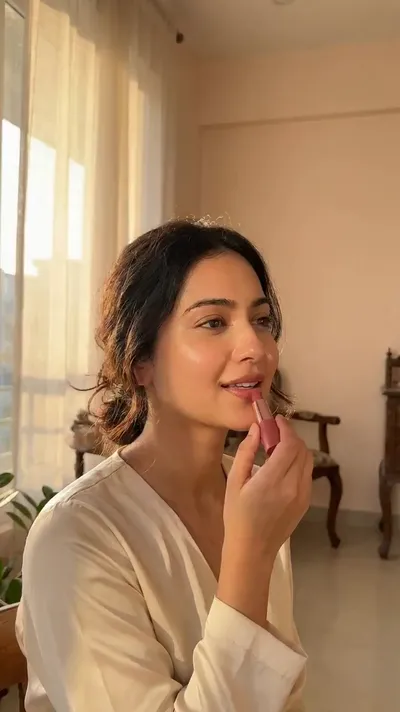
A beauty Reel in native 9:16, no camera or ring light required.
Prompt: A young woman applying makeup and smiling in warm golden hour light by a window, soft flattering glow, aspirational beauty reel aesthetic, gentle natural movement

A cinematic aerial travel shot generated from text, no drone needed.
Prompt: Sweeping aerial drone shot flying over a turquoise tropical coastline with white sand beaches and gentle waves, vivid travel reel aesthetic, bright sunny cinematic look
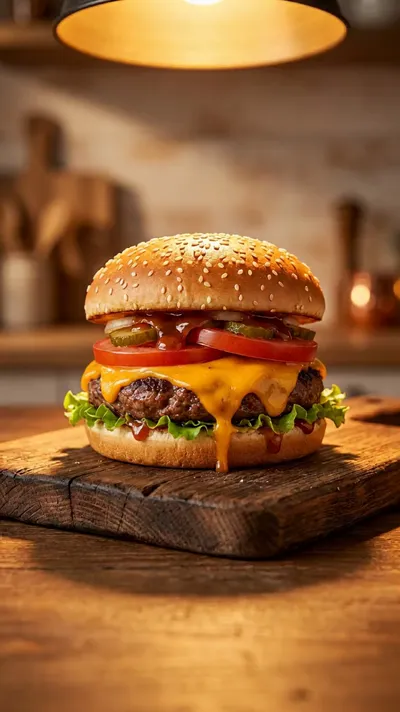
An appetizing food Reel with subtle steam motion that makes the shot feel alive.
Prompt: A gourmet cheeseburger with melting cheese and rising steam on a rustic board, warm appetizing lighting, mouth-watering food reel aesthetic, subtle steam motion
Product and Business Reels:
Vertical 9:16 close-up of a matte skincare bottle rotating slowly on a marble surface, soft morning light from the left, water droplets on the glass, minimal beige background, shallow depth of field, gentle camera push-in
Lifestyle and Aesthetic Reels:
Vertical 9:16 shot of a cozy coffee shop corner, steam rising from a fresh latte, warm afternoon sun through the window, a hand slowly turning a book page, soft bokeh background, calm and inviting mood
Travel and Nature Reels:
Vertical 9:16 aerial view gliding forward over turquoise ocean waves meeting white sand, golden hour light, smooth drone motion, cinematic and vibrant colors
Text-Overlay Backgrounds:
Vertical 9:16 animated gradient background in soft teal and coral, slow drifting light particles, clean negative space in the center for text, modern minimal motion loop
The text-overlay background prompt is handy when you plan to add captions or a hook on top, since it leaves the center of the frame clear.
✨ Best Practices for High-Converting Reels
These habits help your Reels earn watch time, saves, and shares:
- Hook in the first two seconds: Lead with movement, a question, or a payoff so viewers stop scrolling.
- Keep it short and looping: Tight clips under 60 seconds often loop, and loops boost total watch time.
- Design for sound on and sound off: Add captions or on-screen text so the message lands even when muted.
- Respect the safe zone: Center your subject and text so Instagram's buttons and captions never cover them.
- Stay on brand: Reuse your colors, fonts, and tone across Reels so your feed feels cohesive.
- End with a clear call to action: Tell viewers to follow, comment, or visit your link.
- Test and iterate: Generate a few variations, publish the strongest, and let your analytics guide the next batch.
🌟 Why Design Reels with AI on Ambience AI
Ambience AI brings video, imagery, and audio into one creative flow, so you can design an entire Reel without juggling separate apps. Instead of filming, importing footage, and editing across tools, you describe what you want and generate each piece where you need it.
That speed matters for Reels, where consistency drives reach. When a finished clip takes minutes instead of an afternoon, you can publish more often, respond to trends quickly, and keep your audience engaged. Browse the Explore gallery to see what creators are making, and compare options in our best AI video tools guide.
🔗 Related AI Tools and Guides
Build your full Reels workflow with these tools and resources:
- AI Video Generator: Generate vertical video from text or animate a still image
- AI Story Video Maker: Turn a script into a narrated, multi-scene story video
- AI Image Generator: Create scenes, backgrounds, and product shots for your Reels
- AI Audio Generator: Add original music, voiceovers, and sound to your videos
- AI Thumbnail Generator: Design scroll-stopping covers for your Reels
- Best AI Video Tools Guide: Compare the top AI video options for social content
- Explore Community Creations: Get inspired by videos and images from other creators
- Pricing: See credit costs and plans for creating at scale