AI Tips for Creating High-Converting Promo Videos
Learn promo video tips to build urgency and drive action with AI video promotion. Make high-converting videos in minutes, free on Ambience AI, no crew needed.
A great promo video does one job well: it makes people want to act right now. The hard part used to be the production, since filming, editing, and reshoots ate up time and budget. With AI, you can go from a simple idea to a polished, conversion-focused clip in minutes. This guide shares the promo video tips that build urgency, spark action, and turn attention into clicks, all on Ambience AI.
🎯 Why AI Promo Videos Convert
A promo video sells a feeling before it sells a product. Motion, pacing, and a clear payoff pull viewers toward one decision, and AI puts that power in reach of every creator. Whether you launch a product, promote a sale, or grow a service business, AI video promotion lets you test bold ideas fast and keep the winners.
Speed to Market
Idea to finished promo in minutes
Skip the shoot and the editing timeline. Describe the scene you want, and an AI video generator renders it for you. That turnaround means you can launch a campaign the day you think of it and ride a trend while it is still hot.
Lower Costs
Studio-quality promos without studio budgets
You do not need actors, sets, or a production crew to make a promo video that looks premium. AI generation removes the biggest line items, so you can produce a full campaign for the price of a single traditional shoot.
Effortless Testing
Spin up variations to find your winner
The highest-converting promo is the one you discover through testing. With AI, you can generate several hooks, styles, and offers from one concept, then let click-through data crown the version that drives the most sales.
🧱 Anatomy of a High-Converting Promo Video
Structure is what turns a pretty clip into a promo that converts. Most winning promo videos follow the same beats, and you can plan each one before you generate a single frame.
- Hook (0 to 3 seconds): Open with your boldest visual or your core promise so viewers stop scrolling before they decide to move on.
- Problem: Name the pain point or desire your audience already feels, so the message lands as personal.
- Solution: Show your product, service, or offer solving that problem in a clear, satisfying way.
- Proof: Add a quick signal of trust, such as a result, a happy moment, or a before and after.
- Urgency: Give a real reason to act now, like a limited-time discount, a launch window, or a low-stock nudge.
- Call to action: Close with one specific next step, whether that is shop now, sign up, or learn more.
Keep the whole sequence tight. AI-generated clips are naturally short and punchy, which makes them a perfect fit for the fast, focused pacing that high-converting promos demand.
🛠️ What You'll Need
Before you start, gather a few basics so the process stays smooth.
- A free Ambience AI account.
- A one-line message for your promo, such as the offer, product, or feeling you want to sell.
- Your single most important call to action, decided before you generate.
- Optional product photos or brand images if you want to animate something specific.
🎬 How to Make a Promo Video with AI, Step by Step
Follow these steps to build your first high-converting promo from scratch.
Step 1: Create your account
Create a free account to get started with free credits. New creators can explore image and video generation without a subscription.
Step 2: Choose your starting point
You have two easy paths to a promo video:
- Text to video: Open the AI Video Generator and describe the scene you want. This is ideal for lifestyle shots, product reveals, and concept promos.
- Image to video: Create a still with the AI Image Generator or upload a product photo, then bring it to life. Our image-to-video guide walks through this workflow in depth.
Step 3: Write a prompt built to convert
Describe the subject, the mood, the lighting, and the motion you want, then tie each choice to your offer. Think about how the clip reads on a phone with the sound off, since most people watch that way. Keep the focal point centered so it survives cropping across placements.
Step 4: Generate and refine
Render your clip, review it, and adjust the prompt if the framing or motion needs work. Generate a few variations so you have options to test against real viewers.
Step 5: Polish and publish
Add a caption or on-screen text for the sound-off crowd, layer in music with the AI Audio Generator if you want a soundtrack, and design a strong opening frame with the AI Thumbnail Generator. Then publish to your channel of choice and point every viewer at one clear action.
💡 Promo Video Prompt Examples
High-converting promos start with a clear, specific prompt. Here are real promo clips generated on Ambience AI, followed by prompts you can copy and adapt for common goals.
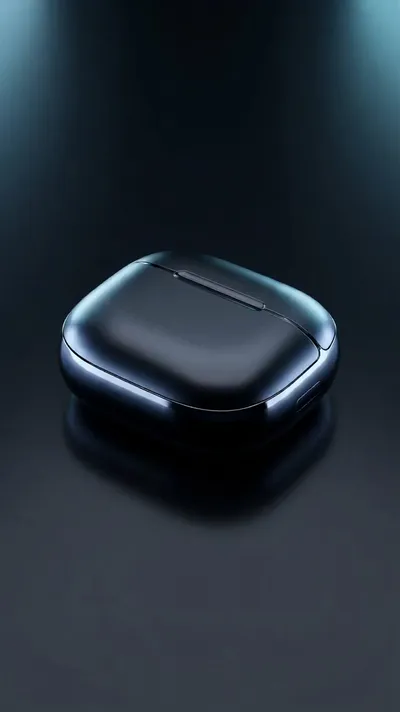
A dramatic product reveal, the hook that stops the scroll in the first second.
Prompt: A premium wireless earbuds case opening to reveal glowing earbuds with dynamic light rays bursting outward, high energy product reveal, dramatic studio lighting, bold dark background, attention-grabbi...
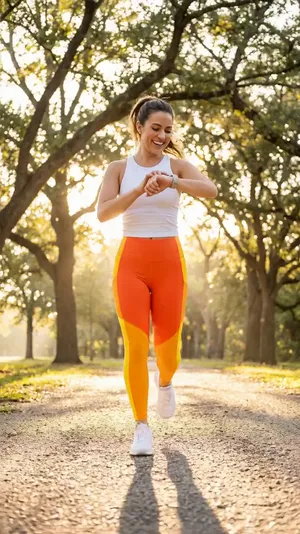
A lifestyle promo that shows the product in a real, aspirational moment.
Prompt: A happy young person smiling and using a smartwatch while jogging outdoors at sunrise, warm golden light, energetic lifestyle promo aesthetic, smooth motion following the movement
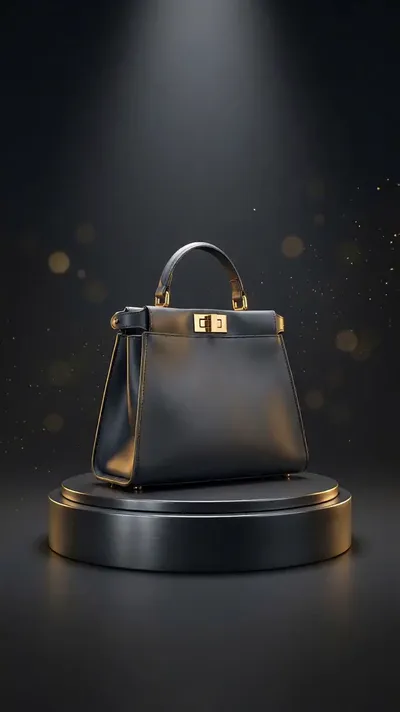
A luxurious rotating reveal for a premium sale or launch.
Prompt: A stylish handbag on a rotating pedestal surrounded by swirling gold particles and soft bokeh light, luxurious dynamic motion, elegant dark gradient background, high-end sale promo aesthetic
Product Launch:
Sleek wireless earbuds rotating slowly on a matte black pedestal, dramatic rim lighting, subtle lens flare, premium tech aesthetic, shallow depth of field, slow push-in camera move, confident and modern mood
Limited-Time Sale:
Vibrant flat-lay of summer sneakers on a bright pastel background, confetti drifting down, playful bouncing motion, high energy, bold and colorful, eye-catching for a limited-time sale
Service Business:
Modern home interior bathed in clean daylight, a plant swaying softly by a large window, calm and premium mood, slow drifting camera, minimal and professional feel for a home services brand
App or Software Promo:
Close-up of a smartphone screen glowing in a dark room, colorful app interface animating smoothly, soft reflections, energetic and futuristic mood, quick zoom to highlight a bright call-to-action button
✅ Best Practices for High-Converting Promo Videos
Small creative choices make a big difference in how your promo performs.
- Hook in the first second: Lead with your most striking visual or your core promise so people stop before they scroll past.
- Design for sound off: Add captions or on-screen text so your message lands even when the audio is muted.
- Build real urgency: Anchor your offer to a deadline, a launch, or limited availability so viewers feel a reason to act today.
- Go vertical: Vertical 4:5 and 9:16 formats fill more of the mobile screen and tend to earn more attention than square.
- Keep it short: Aim for under 15 seconds for direct-response promos, and save longer edits for storytelling and awareness.
- End with one clear action: Give viewers a single next step, since a promo with one ask converts better than one with three.
- Test variations: Run two or three versions with different hooks, offers, or visuals, then put your budget behind the winner.
🌟 Why Create Promo Videos on Ambience AI
Ambience AI brings image, video, and audio generation together in one creative workspace, so you can build a complete promo video without juggling separate apps. You describe what you want, our assistant expands your prompt, and the platform handles the heavy lifting.
That makes Ambience AI a practical promo video maker for creators who want professional results on a small budget. You can start free, test ideas quickly, and scale up only when you find what works. See the pricing page for full plan details, and browse community creations for inspiration.
🔗 More AI Video Tools
Round out your promo workflow with the rest of the Ambience AI toolkit.
- AI Video Generator: Turn text prompts or images into short, high-converting promo clips.
- AI Story Video Maker: Build multi-scene promos and product stories for longer campaigns.
- AI Image Generator: Create product shots, backgrounds, and stills to animate.
- AI Thumbnail Generator: Design bold opening frames and cover images that earn the click.
- AI Audio Generator: Add music and sound to give your promos a professional finish.
- Best AI Video Tools Guide: Compare the top AI video tools to plan your promo strategy.